NanoMarketCap widgets: live Nano instruments for any website
Nano's live pulse now embeds anywhere on the web. nanomarketcap.com/widgets is live: a widget rack, a builder page where anyone assembles a live Nano instrument and drops it onto a website with one copy-paste. Seven instruments ship today: price, market cap, calculator, network stats, account balance, live transactions and donations, in all six site locales. No account required, and every number updates itself.
What the rack holds
The builder is a configurator. Pick a widget on the left, tune the settings, watch the preview update, copy the snippet. The embed is a plain iframe plus a small hosted script (widgets/embed.js) that measures the widget's real height and resizes the frame to match. No fixed-height dead space, no clipping.
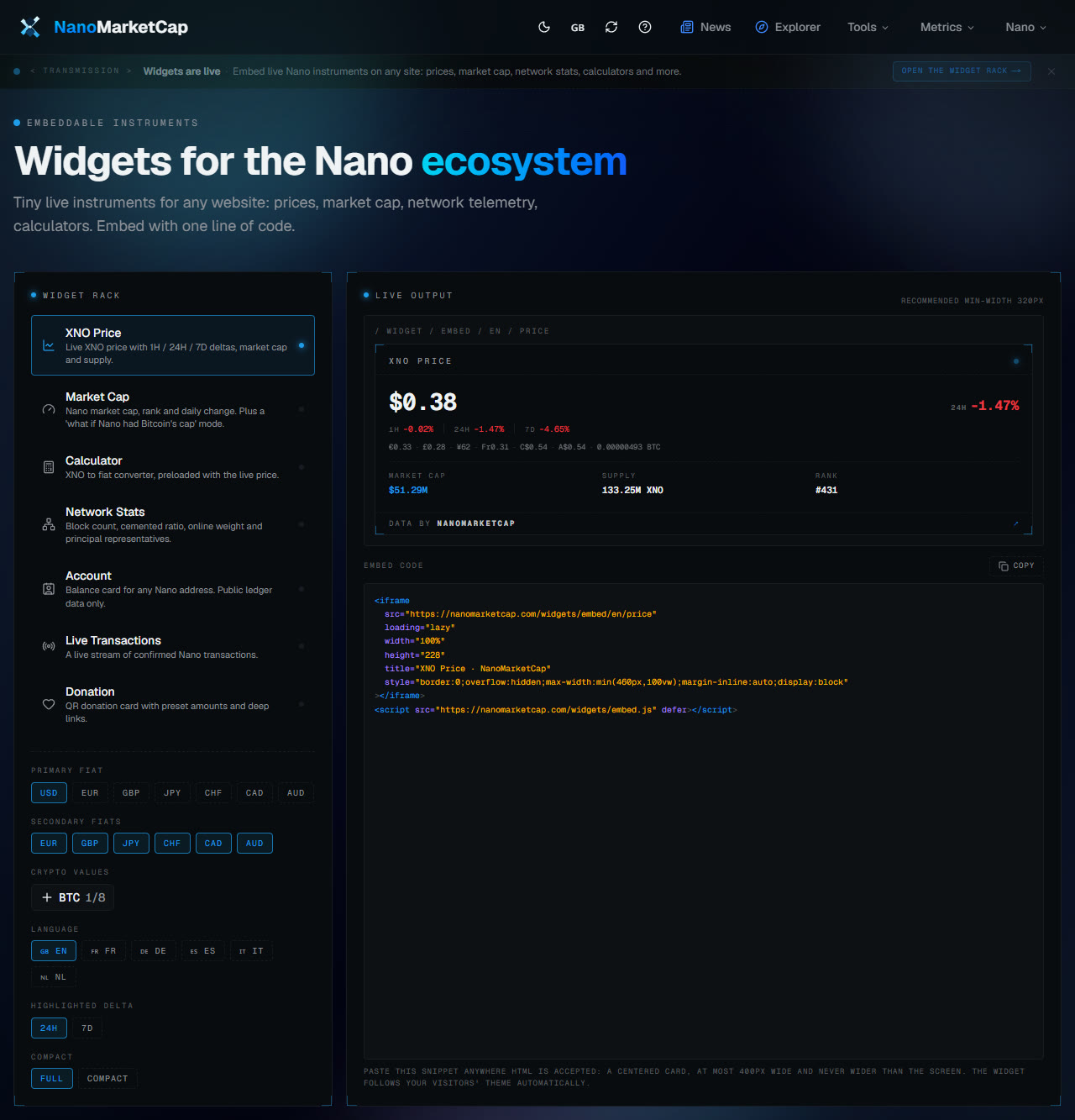
The seven instruments:
- Price. Live XNO price with 1H, 24H and 7D deltas, plus market cap, supply and rank.
- Market Cap. The same card with a hypothetical variant: Nano at Bitcoin's market cap.
- Calculator. An interactive XNO to fiat converter, preloaded with the live price.
- Network stats. Total blocks, cemented ratio, online weight and principal representatives.
- Account balance. A balance card for any
nano_address. - Live transactions. A WebSocket feed of network-wide confirmations as they happen.
- Donate. A QR donation card for your own address.
All seven speak all six languages (en, fr, de, es, it, nl). A widget embedded on a French blog shows French labels to that blog's visitors, with no extra work.
All seven, live, right here
Descriptions are fine, but these things are meant to be seen running. Here are all seven widgets embedded in this article, exactly as you would embed them yourself.
The price widget is the default instrument and the most common embed:
The market cap card has a second mode, and it is the one people ask for first: what if Nano sat at Bitcoin's market cap? It shows the implied XNO price at that cap, comparison baked in:
The calculator converts in both directions, XNO to fiat and fiat to XNO, at the live price:
Network stats are a snapshot of the ledger's pulse, server-rendered and cached for every visitor:
The account widget is a balance card for any nano_ address, with the transaction count, representative and current worth. This one is the builder's default demo address:
And the live feed is the one worth staring at. It connects to public Nano WebSocket relays with automatic failover and reconnect. The count next to the Live label is a running total of confirmed blocks seen since the page opened:
The donate card closes the rack: a QR donation button pointed at the network genesis account, demo only. Point it at your own address and it becomes a real donation button, with preset amounts and deep links:
Want all seven on one page at once? Here is a live CodeSandbox demo: codesandbox.io/p/sandbox/hvjls8.
The details that matter
Currency hierarchy. Each widget has a primary fiat currency (the big number), a strip of secondary fiats, and up to 8 crypto assets the value is also shown in. Stablecoins are excluded from the crypto picker on purpose: "1 XNO = 1.3 USDT" is noise, not information.
No client-side API calls. Prices, caps and supplies are injected at render time on the server, then cached. The widget makes zero API calls from the visitor's browser, so embeds work from any origin, on any site that accepts HTML, with no CORS headers to configure. The live feed is the exception: it needs a WebSocket connection from the browser, and it is the only part of the widget that does.
Theme and width aware. Widgets follow the visitor's theme, light or dark, and switch to a compact layout below 380px, so they behave on phones and in narrow sidebars. The embed script auto-fits the iframe height to whatever the compact or full height happens to be, so there is no wasted space.
Attribution stays. Every widget carries a permanent "Data by NanoMarketCap" plate. It is not removable, and that is deliberate: free live data, with the credit line attached.
Who it is for
The obvious uses first: a community site putting the price in its header, an exchange listing page that wants live network stats next to the deposit instructions, a wallet provider embedding an account balance card into its dashboard.
Then there is the donation widget, which is quietly the most community-shaped instrument in the rack. Anyone running a project on Nano can generate a QR donation card for their own address in about a minute. No backend, no signup, no fee: it renders a QR code and deep links that any Nano wallet understands.
The rack exists to put live Nano data where Nano people already are, instead of making them come to us. Build yours at nanomarketcap.com/widgets. It is free, it needs no account, and the donation cards are already being put to work by the community.